Search This Blog

Showing posts with label Admin. Show all posts

Tuesday, July 5, 2022

Failed to create database, can not create multiple databases that differ only in case.

 Hi

A funny thing happened today.

I needed to work while I was on vacation and my Internet was bad: I needed to create a mail-database on the server.

Initially I tried to do it directly from Notes client installed on my laptop.

I started the creation process (everything was standard: Ctrl+N, chose server, mail template etc) but then I quickly realized that it would take ages. So I break the process by clicking Ctrl+Pause but I kept the creation dialog opened in Notes on my laptop to let me copy filename and database title from it later.

I connected to server via RDP, ran Notes client there, issued "dbcache flush" in Domino console and deleted the incomplete database created by my local Notes client. 

No issues so far.

Then I tried to create mail database from the Notes client on the server by using the same filepath and title which I copied from the still opened creation dialog window in my local Notes client. 

However, I got an error saying "Failed to create database, cannot create multiple databases that differ only in case." I quickly googled it and most of the articles I found suggested to issue "dbcache flush" and "sh nlcache reset" which didn't help me at all. 

I tried to create this mail-database on another server in the cluster - it worked. Then I tried to replicate it to the initial server and got the same error. All these things I made from Notes client installed on the server.

I was very confused.

You know what eventually resolved the problem? 

The trick was to close db creation dialog window in my local Notes client - after that the error had gone.

Tuesday, April 12, 2022

Reply/Forward icon in Mail database

 Hi

Recently we upgraded Notes to V12 and some of our users (which used non-English mail template) complained that they did not see that special icon in Mail views/folders telling which email was replied and/or forwarded.

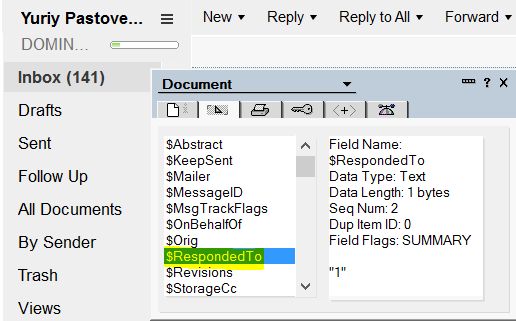
Such icon is connected with the field $RespondedTo which is managed by Notes client itself, it is not created by some lotusscript or @formula in the mail database 


I noticed that this field was missing for those uses which had the issue with the icon.
After some investigation I discovered that this field is managed by Notes if this checkbox is enabled in user's maildb.

and it was disabled in mailboxes of the users complained about the issue.

The funny thing was that this checkbox was enabled in the mail template so I couldn't see the reasons why it wasn't inherited. To fix this issue I simply disabled and then enabled this checkbox back in the mail template and then ndesign.exe started to handle it correctly.


Friday, February 18, 2022

If you server hangs up during DAOS resync...

 Hi

Recently I worked on the issue with one Domino-server which became unresponsive after running program document with command "tell daosmgr resync force" at night. We noticed that in the morning only and you know how stessful it could be :)

I checked the server via Domino Console and it looked alive, it reacted to commands like "sh ta" or "sh ser", however Notes clients couldn't connect to it. I noticed also some other messages telling that something was wrong, like:

Error connecting to server <SERVERNAME>: Remote system no longer responding
Server task Router on <SERVERNAME> is no longer responding
Server task SMTP Server on <SERVERNAME> is no longer responding

I restarted server and when it went up I noticed following errors:

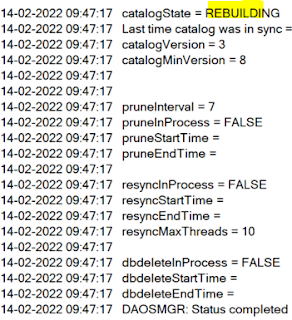
The DAOS catalog cannot be opened. DAOS cannot operate normally.: The integrity of a database storage container has been lost - the container will be rebuilt.

and also many errors like this:

The database D:\IBM\Domino\data\<database.nsf? was unable to write to file D:\HCL\DAOS\0001\912B6AA17EFDE1C9C12587E9002FDA051912B6AA17EFDE1P.nlo: Release 12.0.1 HF24|January 19, 2022

Without thinking twice I ran "tell daosmgr resync" manually and in 10 minutes the server hanged up again with the same symptoms - reacted to commands via Domino Console but Notes client couldn't connect.

I restarted server again, all the errors from the previous start were shown again, but that time I checked DAOS status and it was REBUILDING.


This time I decided to not run resync while catalog was rebuilding and I decided to wait until the evening and then try to do the resync agin. That time resync worked without issues, the only stupid thing I did - I didn't check the catalog status before the running resync, so I can't say if server did something during the day before I ran the resyn again in the evening.

I communicated this case with HCL and they told me that one of the solutions could be to resync the catalog while server is down by running "ndesign.exe resync" (the similar way you can compact names.nsf or log.nsf).


Friday, January 28, 2022

Both Domino 12.0.1 and IF1 contain bug "The caller's SemWait timeout expired."

Hi

Both Domino 12.0.1 and IF1 (HF11) contain bug "The caller's SemWait timeout expired."

You can see this error in Domino logs or if you configure a corresponding Probe in admin4.nsf (Probe Type: Database, Subtype: Error Monitoring).

There are different consequenses of this problem:
  1. sometimes replication does not work properly
  2. sometimes router can't send the email
  3. ...I think there could be more issues, but the two first I expirienced myself...
The errors in log.nsf / console.log may look like:

20-01-2022 09:01:58 The DAOS catalog cannot be updated.: The caller's SemWait timeout expired.
20-01-2022 09:01:58 Router: Agent message: Notes error: The caller's SemWait timeout expired. 

The errors in ddm.nsf may look like:

Database object write error: E:\Data\mail\sxxxxt.nsf: The caller's SemWait timeout expired.

The only solution is to request another hotfix from IBM HCL (HF24) which includes IF1(HF11) + the fix for this problem (see DCKTCARNVR).

Wednesday, November 24, 2021

TSM failed after installing FP3 for Domino V11

 Hi

We installed FP3 for Domino V11 this summer and when we needed to restore some db from the backup TSM failed to do it (though it previously worked OK). The error was:


ACD0004E An unknown error has been detected.
Warning! Error initializing the connection to the TDP library
Could not connect to the Domino server

I googled this article: https://support.hcltechsw.com/csm?id=kb_article&sysparm_article=KB0090343&sys_kb_id=0ace67511bc03050a67e9759bc4bcb61 which provided an explanation and in my case the solution was to add 

SharedMemoryAllowOnly=0 

into server's notes.ini

Sunday, August 8, 2021

DDM probes + Cluster Replicator + intensively used database = Database open error: [filepath.nsf]: Database is currently in use by you or another user

 Hi

Here it is a thing which I spent a few days on.

We had two Domino R11.0.1 FP3 in a cluster. Then we added a 3rd Domino server of the same version into the cluster and after that we started to see many errors like that:

08-08-2021 18:09:53   Database open error: <filepath.nsf>: Database is currently in use by you or another user

Despite the errors in logs, all our applications worked OK, we didn't have any consequences of this error except that it was very hard to use log.nsf, because we could get ~5K such messages per day. The errors referred to a few different databases, but not to all databases we had. The errors were logged on all three Domino-servers. 

I googled and found these two articles without a solution:

So, at the end of the day I didn't find anything helpful in the Internet, except the point that the error message was produced by Cluster Replicator. My first attempts to resolve it myself ended up with nothing, so I decided to contact HCL. 

Unfortunatelly, they couldn't help me either, they suggested some basic advices, like try to delete the database and then replicate it again, try to restart Cluster Replicator and so on.

So, I didn't have any choice except trying to resolve it myself. 

After spending two days on that I discovered that the reason of the issues were DDM probes. We always used DDM probes for server monitoring and didn't change anything there for a long time, that's why it was so hard to catch that but after I disabled them - the error messages stopped to appear.

Now, let me tell you my explanation which is a pure theory but looks reasonable to me.

We rolled out 3rd Domino server because we planned to run a new Web-application which had to attract many new users in the Internet and we wanted to be sure that our Domino-environment would handle the increased workload - we were using external load balancer which had to route users to our Domino cluster and 3rd Domino had to help a lot. 

After we added a 3rd Domino, we ran the application as well and we got more Web-users as we expected.  So, basically, what happened: 

  • More users than before worked with just a few databases (kind of an entry point for the new Web-application);
  • Three Cluster Replicators (instead of two) pushed data to replicas on other servers and they had to do it often than before;
  • DDM worked without changes but it seemed the server tasks executing DDM probes needed to have an exclusive access to the database for a short period;
  • Cluster Replicators worked intensively with a few databases and often failed to open the databases while DDM probes were running and therefore Cluster Replicator showed that message and kept the changes in memory until it would be possible to open the database later.
That's basically it.
Maybe there were specific probes which caused this message, I did not check that, I only tested that: 
  • disabling of probes disabled the messages 
  • enabling the same probes back returned the messages back as well
It is hard even to ask HCL to fix anything because it is good to be able to see such messages, - they can help to identify important issues but on another hand when you get log.nsf spammed with 5K messages per day it is not acceptable either. The only idea is - maybe it makes sense to introduce another notes.ini parameter which could suppress the message, not sure.


Thursday, September 24, 2020

Do you know how to fix the problem that Domino server is not able to decrypt fields in NotesDocument encrypted with its public key?

 Hello

I am expiriencing a problem that one of my Domino-servers can't read encrypted field(s) from SSO configuration documents. 

I did it tones of times in the past and I am sure I do everything correctly this time as well.

I've added notes.ini parameres to debug SSO and got this:

[59771:00002-4091922128] 24.09.2020 17:48:31,32 SSO API> Reading configuration LtpaToken [last read on ], view ($WebSSOConfigs) has changed [last updated on 23.09.2020 01:36:40].

[59771:00002-4091922128] 24.09.2020 17:48:31,32 SSO API> Looking for primary Name and Address Book.
[59771:00002-4091922128] 24.09.2020 17:48:31,32 SSO API> Found [1] Name and Address Book(s), opening first [names.nsf].
[59771:00002-4091922128] 24.09.2020 17:48:31,32 SSO API> Opened Directory [DHANDLE 0x000000D6], opening configuration view [($WebSSOConfigs)].
[59771:00002-4091922128] 24.09.2020 17:48:31,32 SSO API> Found view [NOTEID NT0000031E] for view [($WebSSOConfigs)], getting view collection.
[59771:00002-4091922128] 24.09.2020 17:48:31,32 SSO API> Opened view collection [DHANDLE 0x000000D1], searching for config [LtpaToken]
[59771:00002-4091922128] 24.09.2020 17:48:31,32 SSO API> Found note [NOTEID NT00006DB2] for config [LtpaToken], opening.
[59771:00002-4091922128] 24.09.2020 17:48:31,32 SSO API> Opened note [DHANDLE 0x00000019] for config [LtpaToken], decrypting.
[59771:00002-4091922128] 24.09.2020 17:48:31,32 SSO API> ERROR: when reading configuration [You cannot access portions of this document because it is encrypted and was not intended for you, or you do not have the decryption key.].

The funny thing is that Domino Domain contains two servers and another Domino-server does not have any issues - the same Web SSO configuration document works OK there.

I would like to ask you to share any ideas what is worth to check in addition to resolve the problem.
Please fines some details below.

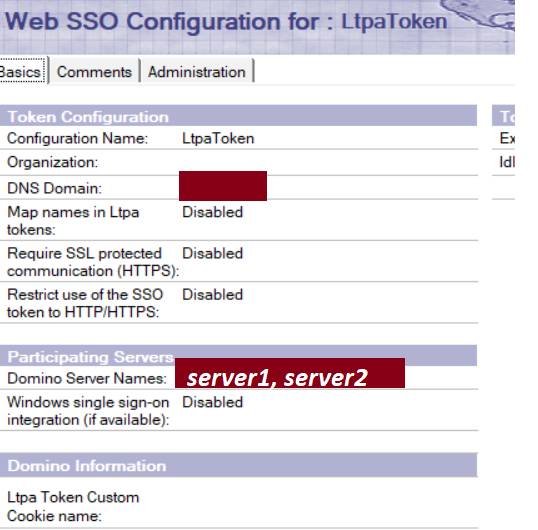
The SSO document contains two server names + my name in "Public Encryption keys" field:

The document is ecnrypted


SSO config is also pretty standard (both servers do not use Internet Documents):


As I said - all works well on the second server but the first server can't read SSO keys.

I know how RSA encryption works (at least I think so) and I double checked that public key in server document was exactly the same as it was in its server.id. 


Can you please advice what else to check/try?


Tuesday, May 8, 2018

FP9 failed to install because certificate expired since Fri Apr 20

Hi

Today I wasted some time on issue with installation of FP9.

I reinstalled Windows on my laptop, installed IBM Notes client 9.0.1 and then tried to install FP9 using setup file I used many times before. However this time installation failed. At first I thought it was caused by my Windows because I like to disable in Windows everything I can. However when I tried to install FP9 on another VM I had got the same issue:


I read logs provided by FP9 installation but didn't find anything helpful there, just

CustomAction PreRunProvisioning.5F3129E8_3AD4_4346_AEE6_A314E2DE64D9 returned actual error code 1603 (note this may not be 100% accurate if translation happened inside sandbox)
Action ended 18:51:01: InstallFinalize. Return value 3.

Then I checked logs in IBM\Notes\Data\workspace\logs and found there a following line:

CWPST1015W: Plugin com.ibm.rcp.provisioning.feature_9.0.1.20170629-1747 failed to install.   
The reason provided is CWPST1002W: Signature has expired


Then I googled this post and used workaround by adding setting com.ibm.rcp.security.update/EXPIRED_SIGNATURE_POLICY=ALLOW to plugin_customization.ini - worked OK for me.

Monday, June 12, 2017

Strange decision within IBM Verse update for June of 2017 on Android devices


Hi

IBM released a new update for IBM Verse in June 2017 - here is a link to "what's new".
There is a new feature for Android about:

Verse for Android: Certificate-based authentication

However I don't think the way it works is correct.
See my story below...

Friday, January 27, 2017

Great news about BM Notes/Domino 9.0.1 Feature Pack 8


IBM Notes/Domino 9.0.1 Feature Pack 8 Preliminary Release Notice
January 27, 2017

Beginning with 9.0.1 FP8, fix packs have been renamed to feature packs. To ensure quality, these feature packs still have a high focus on addressing high impacting defects. Where possible, these features are optional enabled to minimize risk. The same packaging, architecture and install kits used in previous fix packs remain in use for feature packs.

IBM has identified important Notes/Domino SPRs to be fixed in the latest Feature Pack release, 9.0.1 Feature Pack 8. This notice serves as the Preliminary Fix List. All fixes in this Feature Pack have been selected through our Triage process of high impacting customer requested bug fixes and are currently undergoing testing. IBM reserves the right to remove any fix from this targeted release if it does not pass quality engineering tests. Please consider this information to be provisional. Do not base irreversible business decisions on this information until the Feature Pack has been officially released.

The Notes/Domino Fix List website on developerWorks will show you the status of this Feature Pack on the Upcoming Releases tab. This preliminary Release Notice will be updated to include a more descriptive explanation of the problem and fix, where applicable. Also, a link to the technote and regression information will be provided.

Notes/Domino 9.0.1 Feature Pack 8 addresses defects in the Client, Server, and the Domino OpenSocial component. All Feature Packs are language independent and may be applied on any language version of Notes/Domino 9.0.1.

Notes/Domino 9.0.1 Feature Pack 8 includes new features that benefit our customers. Some of these features have been in development for years and we are excited to make them available. Please refer to the "New Features" section below for more details.


Supersedes 
9.0.1 Feature Pack 8 includes all of the content and supersedes the following deliverables:
  • Notes: 9.0.1 FP7, 9.0.1 FP7IF1, 9.0.1 FP7IF2
  • Domino: 9.0.1 FP7, 9.0.1 FP7IF1, , 9.0.1 FP7IF2
  • iNotes 9.0.1 FP7, 9.0.1 FP7IF1, 9.0.1 FP7IF2, 9.0.1 FP7IF3

Decision to upgrade
Customers are urged to upgrade to the latest Release and Feature Packs (in this case, 901FP8) to benefit from later features and fixes made to the product. By providing a number of features and fixes, customers are able to accept fewer code changes with lower risk, allowing them to "patch" an older Maintenance Release.

Feature Packs provide important fixes and IBM strongly recommends applying the latest Feature Pack available for a Maintenance Release to receive the broadest set of fixes available.


Things to Note:
  • NBP replaced with ICAA - There is no NBP (Notes Browser Plugin) shipped with 9.0.1 FP8. This has been replaced with ICAA (IBM Client Application Access). For more information, see IBM Client Application Access V1.0.1 documentation
  • Notes Client on Linux - There is no Notes client for Linux shipped with 9.0.1 FP8. This client platform has been discontinued and customers are encouraged to move to Windows or Mac.
  • Domino Server on Linux32 and AIX32 - There is no Domino Server for Linux32 and AIX32 shipped with 9.0.1 FP8. This server platform has been discontinued and customers are encouraged to move to the 64-bit platforms. Windows 32 bit remains a shipped and support platform.
  • Windows Server 2016 Support - (SPR #SVROAEPS4R)


New Features in IBM® Domino® 9.0.1 Social Edition Feature Pack 8

The documentation in Knowledgebase will be updated with these new features to coincide with the ship date of 9.0.1 FP8

1) Optionally Move Views outside of NSF  for Increased data store in NSF.
This feature is useful for large databases and provides the following benefits:
- A smaller database file size, to avoid reaching the 64GB limitation.
- Faster database backup and restore.
- Better performance by allowing concurrent access to database and views.

2) Java Upgrade to 1.8.
The Java run time environment provided with Domino has been upgraded to Java JRE version 1.8 to provide you with access to the latest features.

3) Optionally Increase Document Summary Data (SPR #AKNX64TLRS APARID: LO04193)
You can increase the document summary data limit on Notes 9 databases to 16MB from 64K. (The size limit for a single field remains 32 K.)


4) Add support for ADFS 3.0 and update the corresponding Cookbook instructions for configuration.


New Features in IBM® Notes® 9.0.1 Social Edition Feature Pack 8
1) Optionally Add Show Options: "Group By Date" And "Beginning Of Message", To Desktop Policy Settings (SPR #JSTN98BP3T APARID: LO75595)
Administrators can add the notes.ini setting EnableGroupByDate=1 on mail servers to enable the Show > Group By Date option in all mail files.

2) Optionally Retain MIME formatting when forwarding or replying to internet messages
A notes.ini setting is now available for Notes Standard clients to retain MIME message formatting when users reply to or forward messages received from the internet. Without this setting, MIME messages are converted to Notes Rich Text which can cause some MIME formatting to be lost.

3) Optionally Enable displaying internet addresses in mail and calendar documents
You can enable internet addresses rather than Notes addresses to display in the Notes client mail and calendar. For example, display sdaryn@renovations.com rather than Samantha Daryn/Renovations@Renovations. To enable this feature, add the following setting to the notes.ini file on a Notes client $INETADDRESSFIXUP=1


Fixes contained in this Feature Pack
A plus symbol (+) before the SPR number indicates a fix for a regression bug. A regression bug is an issue that was introduced in a Maintenance Release but did not exist in previous releases of that code stream. For example, a bug that appears in 9.0.1 but did not exist in 9.0.0 is a regression.
If an APAR exists for the corresponding SPR, the APAR number will appear in parentheses next to the SPR number. For example, SPR #nnnnnnnnnn (LO12345).

The Fix List database on developerWorks contains the description of each fix in this Feature Pack, and indicates which platform(s) have been fixed.

9.0.1 Feature Pack 8 Preliminary Fix List descriptions:

Domino Server
CSYL9VBRVE (LO84524) - Fix an issue where calendar updates do not update the notes invitee's calendar If autoprocessing is enabled.
GMAA7YUHGZ (LO47397) - Allow users the option to disable password history.
+KGEW7QNV85 (LO39186) - Fixed a problem where Notes is unable to send an internet email message if the address is enclosed in single-quotes. This was a regression introduced in 9.0.1.
BBSZAB5DFH (LO89375) - Fix an issue where a vaulted NSL user is not able to get new keys when public key checking is enabled.
+KBRNAEMPX2 (LO90491) - Fix a threading mismatch issue resulting in problems with cluster replication on Linux64/zLinux64 systems. This was a regression introduced in 9.0.1 FP7.
MJBC9EBVCN (LO78311) - Fix an issue where new documents are lost when compact -REPLICA is running in a mail database.
ALSR8ZZR5J (LO72622) - Fix an LDAP search authentication issue with special characters.
MJTMA8J3MU (LO88473) - Fix a server crash issue.
+MKIN9Z6S5D (LO89583) - Fix an intermittent database issue preventing users from opening a database resulting in the following error "This database is currently in use by another person or process, and cannot be accessed at this time". This was a regression introduced in 9.0.1 FP7.

Notes
ARBQ9Q5HR9 (LO82463) - Fix an issue where messages sent from clients to external recipients will move addresses from the CC field to the TO field on replies.
ADONADJUDF (LO90147) - Fix an issue with the dialog prompting "How Do You Want To Open This File?" when opening a jpg or bmp file.
JGRN84PJJF (LO45099) - Fix intermittent client crashes using the Notes Client together with OLE apps.
GFAL9V7UQ2 (LO84501) - Fix the error "Your Public Key Does Not Match The One Stored In The Address Book" when the user's person document has been updated with their new public key but not the local/vaulted ID file.
PEDSA7QK9P (LO87584) - Fix an issue where the Notes Client SSO connection expires after the user's IBM notes client is left inactive for some time.
AYAVACYBSJ (LO90045) - Fix an issue where an XML attachment is rendering as part of the message body.
+RGAUADUM59 (LO90248) - Fix duplicate attachment icons when using LS embedobject to attach files to a notesrichtextitem. This was a regression introduced in 9.0.1 FP7.

iNotes
XNTCADK4VX (LO90168) - iNotes: Fix issue in Chrome 53 causing no response after clicking any item in Show menu.
+MBLTADSK8M (LO90227) - Fix a problem resulting in "formula error" and failure to log on to iNotes if the server locale is non-English, e.g. German. This was a regression introduced in 9.0.1 FP7.
+KRAUADZLLH (LO90288) - Fix the ActiveX control pop-up when the file attachment utility is disabled. This was a regression introduced in 9.0.1 FP7.
VTMHAH8Q8P (LO091213): Meetings created in iNotes using OS timezone Brasilia are off by 2 hours

Monday, September 14, 2015

LDAP on Domino with iPhone (iOS8x) - can it work? (Updated)

Hi guys.

May be you can help me with this.
I need to provide users with ability to access Domino Directory (primary or additional) through iPhone LDAP account. Today I've spent a whole day on that and failed eventually. Sad feeling.

At the beginning the task looked extremely easy:
1) enable SSL on Domino server for Internet LDAP users ;
2) quick adjusting of Server document and Configuration document regarding LDAP task;
3) run "load ldap" from Domino console and enjoy;

I downloaded LDAP Admin (just a first link among search results) for testing purposes and made sure that everything worked perfectly. Here are a few proving screenshots.

Tuesday, September 1, 2015

Be care with @Domain part when you deal with user names

Hi

Recently I found a thing that worth to pay attention to.

You could notice that when you create a new email, select user from Domino Directory and then press F9 then @Domain part is automatically added to the end of the Notes-name.

Here are some screenshots:

image 1: after user selection but before pressing F9

image 2: after pressing F9

However, what is not probably clear for everyone is that ...

Tuesday, August 26, 2014

"None of the authentication methods supported by this client are supported by your server" - error when sending by Domino IMAP - RESOLVED!

Hi guys

Probably you can help me.
I am trying to let user work with Domino mail by IMAP.
This is not something new for me and I have resolved this task many times before but now I can't :-(

I have a Domino server 8.5.3 FP5 x64 on Windows Server 2008 R2.
I have enabled IMAP task on Domino server, I have converted all mail databases to support IMAP using convert utility. I checked with telnet that 143 (IMAP) and 25(SMTP) ports are opened and reachable. We do not use any encryption currently.

I configured my Outlook 2013 to connect to Domino mail by IMAP and I do receive inbound emails but I can't send anything - I get the error "None of the authentication methods supported by this client are supported by your server".

Let me show you several screen shots.

Thursday, July 17, 2014

Corrupted unread list in Mail database caused "This database cannot be read due to an invalid on disk structure"

Hi

I believe every IBM Domino administrator worked on issues related to invalid structure of Notes database.
Sooner or later it happened.

There are many reasons, why it may happen:
- issues with Antivirus/Anti-spam/Backup software
- different issues with Richtext/MIME items
- issues with DXL export/import
- issues with missing NLO-files
- ....other reasons .....

Today I resolved such issue for a mail database.
It was caused by corrupted note with unread list.
I performed following steps:

Monday, January 6, 2014

Agent on even "After new mail has arrived" says "Agent will not run on ' ' "

Hi

Recently I have got an issue with an agent that worked on event "After new mail has arrived".
It printed to console a message: Agent will not run on ' ' and didn't do its job.

The reason of that was that agent was configured to be run on behalf of a person, which did not have any Mail configuration defined in his Person-document.


Actually this is a quite known issue - a runner of an agent (or a signer if there is no any value in "Run on behalf of") should have a current server as a home Mail server in his Person-document. So to fix it select another person for "Run on behalf of" or update the current runner/signer person-document with a corresponding mail information.


Wednesday, November 27, 2013

$NoPurge

Hi guys

Recently one LN user asked me "why can't I archive some of my emails (not calendar events) using top menu option Actions\Archive\Archive selected documents?".


When I checked it myself I saw a following message: "Some of the selected documents were not deleted because they are still required in this database."


Actually, such emails were copied to archive database but could not be removed from the active mail database by some reason.

I googled a little and found only two more or less helpful articles:

http://www-01.ibm.com/support/docview.wss?uid=swg21599726
http://www-10.lotus.com/ldd/dominowiki.nsf/dx/02192008121323AMWEB85W.htm

They helped me to find the reason: problem emails had an empty $NoPurge field.

What I cannot get so far is how to get an empty "$NoPurge" field when email is not marked up with "Follow Up" flag.

Do you know?

Tuesday, November 5, 2013

IBM Notes recurrent calendar events in MS Outlook - finally works with R8.5

Hi guys

Probably you met the issue: recurrent calendar event sent from IBM Lotus Notes to external mail systems (like MS Exchange/Outlook) sometimes cannot be opened, sometimes can be opened but displays only the first occurrence etc.

With iCalendar format for IBM Notes calendar events introduced in IBM Notes 8.5 this issue can be handled properly. Here is a re-post of how it can be done.

Thursday, July 4, 2013

CWPST007IE: The maximum number of login attempts has been exceeded.

Hello

After I began to use IBM Notes 9 I get following error from time to time when I try to open Domino Designer after a few switching between different ids:

When I click "OK" IBM Notes closes itself without any question.

I Googled it a little and found that IBM accepted this bug into the list of things which should be fixed in a future releases. 

As a local fix IBM suggests to remove folder "workspace" :-) 

I have a feeling that I saw the same suggestion regarding other completely different issues with IBM Notes so it seems reasonable to put removal of this folder into Windows startup :-) haha


Wednesday, July 3, 2013

IBM Notes 9 may corrupt local names.nsf on crash

Hello guys

Today I experienced this problem 5th time so it is obvious a bug in IBM Notes 9.
The problem is that when your IBM Notes crashes it may happen that your names.nsf will be corrupted and all location documents are dead. Today I got this issue again - in general it is a 5th time since I started to use IBM Notes 9: twice with IBM Notes 9 beta and 3 times with public release 9,

How it looks:

1) My IBM Notes 9 crashed.

Thursday, April 18, 2013

IBM Domino Fix Pack 4 resolved the issue with Cyrillic in IBM Traveler on IBM Domino 8.5.3 FP3

Hello

As you may know new fix pack 4 for IBM Domino 8.5.3 is available for download from April 15.
The most valuable fix for me there is regarding issue with Cyrillic in IBM Traveler on IBM Domino 8.5.3 FP3.

Here I posted a description of  the issue I met and failed to resolve.
Fortunately, this fix pack fixed it.

However, I did not find any explicit mention about fixing this bug in release notes.
So, probably it was auto fixed somehow.
Well, better than nothing (c) Bear Grylls.