Search This Blog

Showing posts with label Notes features. Show all posts

Tuesday, September 1, 2015

Be care with @Domain part when you deal with user names

Hi

Recently I found a thing that worth to pay attention to.

You could notice that when you create a new email, select user from Domino Directory and then press F9 then @Domain part is automatically added to the end of the Notes-name.

Here are some screenshots:

image 1: after user selection but before pressing F9

image 2: after pressing F9

However, what is not probably clear for everyone is that ...

Thursday, May 21, 2015

How to display remote images in received email programmatically

Hi

You might received emails with HTML content with images which were not displayed by default so you had to click "Show Images" action  to see them.


If you are curious what "Show images" action actually does, then everything is simple - it just sets fieldname "$DelayedImagesOK" to value "ok"


Sunday, January 11, 2015

CFD vs "Computed text": CFD wins if many items are needed

Hi

Recently I worked on Notes-form that had to be really dynamic regarding displaying different fields for different conditions: changing of one field might hide or show a bunch of other fields and field labels also could be different for different conditions.

At first I used Computed For Display fields to compute and display field labels.
Everything was more or less OK but later I thought that probably it was a bad decision to use CFD fields instead of <Computed Fields> because:
  • there is a limitation of 64Kb for all fields with flag isSummary=True (works for CFD also);
  • Domino Debugger can show only 255 items so excess of CFD fields could prevent me from seeing other needed items during debugging;
  • it makes harder to analyze fields in a document properties window when it's open in UI;

Wednesday, September 10, 2014

If you can't remove lotus notes database icon from workspace

Hi

Here is a case.
I had a server based database and its local replica in "Test" folder on my computer.
I had both database icons stacked together.

Then I moved local replica to another folder using Windows file system.
Let's imagine it is "NewFolder" folder.

I added database icon of that relocated local replica to Lotus Notes workspace so I've got three icons eventually.

I did not need all of them since the middle one (in Test folder) did not exist any more.
However when I tried to remove it using "Manage List..." option I received a message that it couldn't be done.

I tried manually to remove all three icons and then add only two relevant icons - it didn't work, I still got three of them. 

However after I removed all three icons manually from workspace, closed Notes client, compacted desktop8.ndk, opened Notes again and added icons of server and local replica to workspace back I've got only two icons as I wanted to get.


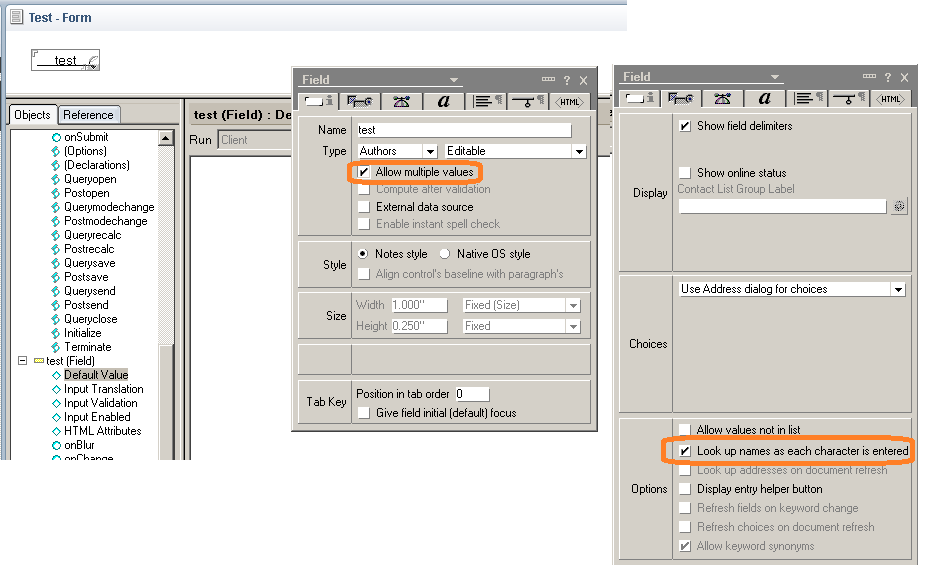
Multivalue fields with "look up names as each characters is entered" property enabled add comma to the value end in Lotus Notes 8.5.3.FP6

Hi

Probably it worked always like that but I just noticed that when you set Names/Authors/Readers field as Multivalue field and enable "look up names as each characters is entered" property, unexpected comma appears in the end of value in UI, though back-end value is OK.

I experienced that only in LN 8.5.3.
I checked it in LN 9.01 and it was OK (no comma) there.

Look on screens below


This strange behavior confuses users - they ask me if there is any 'empty value' in the field.
I also used to see comma only if there is any value following by it.
Comma deleting does not help - it appears on any refresh or save.
This is so odd :-)


Saturday, July 26, 2014

FTSearch "show results" field - cool thing

Hi

You could notice that FTSearch results can be displayed in different ways.
Sometimes with relevance line on the left, sometimes with document selection, sometimes without it.


Thursday, May 29, 2014

You can't have an empty item 'SecretEncryptionKeys' in NotesDocument if there is no encryption enabled field on form

Hello

Probably you know, that item "SecretEncryptionKeys" is used for keeping a list of secret keys which are used for document fields encryption. IBM Lotus Notes creates this item automatically if you enable encryption for any field and select secret key on the last tab of form properties window.


Recently I had to remove such encryption for one application that used it before.

Monday, January 6, 2014

Sunday, January 5, 2014

Beautiful approach for IBM Lotus Notes Mail + Sidebar integration solution

Hello

In this post I would like to share with you a nice approach for building mail integration solutions based on:

  • Native capabilities of IBM Lotus Notes to create eml-files from dragged 'n dropped emails
  • IBM Notes sidebar
  • HTML 5 File API
Though the approach is simple I think it has a good potential to be used for many solutions.

So, the general task is next: we need to let IBM Lotus Notes users to drag 'n drop required emails from their Notes mail databases to a sidebar widget to send these emails to some external system (CRM, ERP, any back-end...). 

When I started to investigate possible solutions I found a few examples (btw, there are not so much information about such kind of tasks in Internet) mainly based on Java, Eclipse extensions and so on - in other words based on technologies where I am not good enough (at least yet ;-) ). I was looking for something more simple and finally I decided to go with the following approach.

Wednesday, November 27, 2013

$NoPurge

Hi guys

Recently one LN user asked me "why can't I archive some of my emails (not calendar events) using top menu option Actions\Archive\Archive selected documents?".


When I checked it myself I saw a following message: "Some of the selected documents were not deleted because they are still required in this database."


Actually, such emails were copied to archive database but could not be removed from the active mail database by some reason.

I googled a little and found only two more or less helpful articles:

http://www-01.ibm.com/support/docview.wss?uid=swg21599726
http://www-10.lotus.com/ldd/dominowiki.nsf/dx/02192008121323AMWEB85W.htm

They helped me to find the reason: problem emails had an empty $NoPurge field.

What I cannot get so far is how to get an empty "$NoPurge" field when email is not marked up with "Follow Up" flag.

Do you know?

Saturday, January 12, 2013

"Show Toolbars Only When Editing" in IBM Notes 9

Hello

After installation of IBM Notes 9 beta over my IBM Lotus Notes 8.5.3 I did not find my toolbars in Notes.

I checked "File\Preferences\Toolbars" and found all my toolbars there: all of them where enabled and visible. So at first I decided that something wrong happened with installation of IBM Notes 9 beta over previous release but then I discovered that there is a new option in Notes top menu that caused this behavior - "View\Toolbar\Show Toolbars Only When Editing"

It seems like this option is enabled by default for IBM Notes 9.

When I switched it off all my toolbars appeared.


Do you know what is menu File\Application\Publish for?

Hi guys

Just realized that my IBM Notes client has a menu option I am not aware about
Do you know what menu File\Application\Publish is for?


Of course I tried it and created a document in "Application Library" (dblib4.nsf) database but what is it for?
I suppose it should be something more or less important since IBM included this point into this menu.

Do you know what benefits produce this menu option?
What is the case of using "Application Library"?

I Googled it and read both standard Help database and "About /Using this database" of "Application Library" but still can't see a reason of using it.